 By
By Most of us never think twice about the browser just sitting there on our desktop. It came preinstalled, it works, and switching feels like unnecessary effort, even a hassle. But what if the browser you already use every single day could quietly fund ocean cleanup crews while you pay absolutely nothing extra, without changing a single habit of yours? Thats the idea behind Wave, a Green Browser built on the same technology as Chrome, but with a very different mission kinda baked into its core.
In this review we’ll sort of go through what Wave actually offers, how it stacks up against the browsers you already know, and whether its environmental angle is more than just clever marketing.
What Exactly Is a Green Browser Like Wave?
Wave Browser is a free web browser built on the Chromium open source project, the same kind of base used by Google Chrome and Microsoft Edge. So yeah, the interface feels instantly familiar, like you’ve been there before, even if you havent. There’s no learning curve, no confusing settings menu, and not really any awkward adjustment period. You open it and it just works the way you expect a browser to do, no extra fuss.
What makes Wave different isn’t really how it looks, more like what it does behind the scenes . Every time you browse, check email, or stream a video using Wave, you’re basically helping fund real ocean cleanup operations. This happens through the browser’s partnership with 4ocean, a certified B Corp founded by two surfers who later became environmental advocates. That partnership is the core idea here, the reason it comes off as a genuine Green Browser and not just a renamed Chrome clone.
How a Green Browser Differs From the Competition
Most mainstream browsers mostly compete on speed, privacy protections, or extension ecosystems. Wave kinda goes sideways from that entirely. Rather than asking people to give money separately, or join some premium tier, it takes everyday browsing revenue and turns it into support for verified cleanup teams who work across the United States, the Caribbean, and Indonesia.
No extra sign ups are required. No added clicks. Your usual daily online life, like checking emails, looking up a topic, or watching a video becomes part of a bigger network that actively pulls plastic, and other debris out of rivers and coastlines. It’s one of those rare things where doing nothing differently still ends up producing a measurable, genuinely positive result.
Key Features That Make Wave Worth Considering
Beyond its environmental mission, Wave kind of bundles in a surprisingly number of built in tools that a lot of other browsers need third party extensions to match. Here’s a sort of breakdown ,of what comes standard.
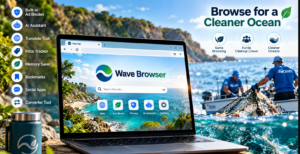
- Built in Ad Blocker – Filters out intrusive pop ups and banners automatically, which also helps pages load faster and reduces exposure to malicious ads.
- AI Assistant – Lets you summarize articles or ask questions directly inside the browser without opening a new tab.
- Translate Tool – Instantly translates full pages or selected text into other languages, useful for research or international browsing.
- Price and Package Tracker – Monitors prices on items you’re watching and consolidates shipment tracking in one place.
- Memory Saver – Frees up system resources from inactive tabs, which can noticeably improve performance on older machines.
- Bookmarks and Reading List – Simple, built in organization tools for saving articles and sites you want to revisit later.
- Sidebar Social and Messaging Apps – Access chat platforms without leaving your current tab.
- Converter Tool – Handles unit, currency, and measurement conversions instantly, without needing an external site.
None of these features require a paid upgrade or a separate extension download. They’re simply part of the default experience, which is unusual for a free browser.
Is This Green Browser Actually Safe to Use?
Safety is usually the first question people ask when trying something new, and it’s a fair one really. Wave is built on Chromium, so it uses the same underlying security architecture as the most widely trusted browsers on the market. On top of that, it carries AppEsteem certification, which means independent evaluators have checked the installation flow, data handling practices, and the overall level of transparency.
Just as importantly, Wave installs and uninstalls cleanly, no drama. There’s no bundled software creeping onto your system , no hidden background processes, and no leftover files after you remove it. And combined with its built in ad blocker—reducing your exposure to sketchy, malicious advertising it tends to hold up well against the common security concerns people worry about.
The Environmental Impact Behind the Green Browser Label
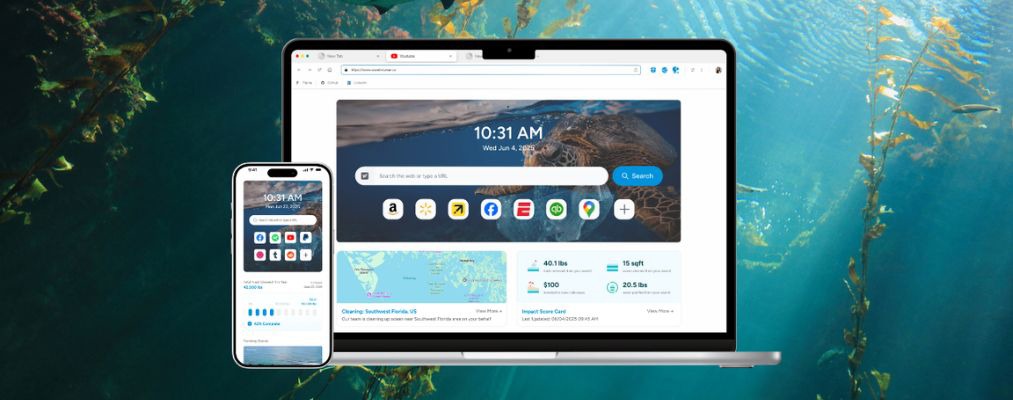
It’s pretty easy to be skeptical of companies that say they have environmental benefits without proof. Wave sort of addresses that right away with a live impact tracker, showing verified stats on how much plastic and trash has actually been removed, thanks to its deal with 4ocean. This isn’t some vague promise hidden in a press release, it’s more like an ongoing visible number people can check anytime.
Also, the company has set a public goal of removing over 300,000 pounds of trash by 2028. Even if that target isn’t fully reached (whatever, life happens), the fact they track and share progress openly is what makes it different from typical corporate greenwashing.
Desktop and Mobile Experience
Wave is available across Windows, macOS, Android and iOS so, it ends up being broadly accessible no matter what device you tend to use most. On the desktop version you get pretty much everything, including the full feature set, those sidebar apps, an AI assistant, and advanced settings, so it feels like a solid choice for everyday tasks and also research stuff. For the mobile app it cuts back on a few desktop specific bits but it still keeps the key pieces, like the ad blocker. So overall the core experience stays pretty consistent.
Final Verdict
So, is Wave worth switching to? If you are the type of person who wants your everyday habits to quietly help something bigger, without added effort , extra cost, or extra clicks, this browser makes a pretty compelling case. It stacks a familiar Chromium base, a solid set of in built productivity tools, a verified security certification, and a transparent environmental mission that is backed by real numbers, not just marketing language.
Now, it may not replace your current browser for everyone, especially if you depend a lot on specific niche extensions that might not exist elsewhere. But for the average user who wants a safe, feature rich, purpose driven alternative, Wave kind of earns its spot as a serious contender, and that’s it.
Frequently Asked Questions
- Is Wave Browser safe to install on my computer?
Yes. It’s built on Chromium and holds AppEsteem certification, confirming clean installation, responsible data handling, and no hidden bundled software. - Does using Wave really help clean the ocean?
Yes. Through its partnership with 4ocean, browsing revenue funds certified cleanup crews, and progress is tracked publicly through a live impact tracker. - Is Wave Browser free to use?
Yes, Wave is completely free across Windows, macOS, Android, and iOS, with no subscription required to access its core features.